


If you run training, certification, or any structured learning program, you've probably hit the same wall most L&D teams hit around year two. The courses look great, but nobody can prove anyone actually learned anything.
That's the job of an online assessment platform. The best ones don't just deliver tests. They turn learner responses into insight: who struggled, where confidence shifted, and whether training changed anything. Done well, assessments become the feedback loop that makes the rest of your program work.
The catch is that "online assessment platform" has become a catch-all label. Test builders use it, survey tools use it, and LMS add-ons use it. Some are genuinely useful. Others are little more than a form with a logo. This guide covers what to look for, what it costs, and how to choose.
What Is an Online Assessment Platform?
An online assessment platform is a cloud-based system for creating, delivering, scoring, and analyzing tests, quizzes, exams, and surveys. Organizations use it for certification, compliance training, skills testing, pre-hire screening, and measuring whether a course worked.
Some platforms are standalone testing tools. Others are built into a learning management system (LMS), so assessments connect directly to courses, certificates, and learner records.
The Core Features That Matter
Strip away the marketing, and every credible platform should cover the basics:
- Multiple question types. Multiple choice, true/false, fill-in-the-blank, essay, and drag-and-drop at minimum, plus survey-style questions such as Likert scales for measuring opinions and confidence.
- Question banks and randomization, so learners don't see identical tests and answers can't simply be passed around.
- Time limits and attempt controls, including the ability to pause and resume where it makes sense.
- Security options. At minimum, a lockdown mode that limits copying and right-clicking. For high-stakes exams, look for live or automated proctoring.
- Automatic scoring for objective questions, plus a clear workflow for grading written answers manually or with a rubric.
- Analytics at the question, learner, and cohort level.
If a platform can't do these reliably, everything else is decoration.

In BrainCert, assessments support 10+ question types, including multiple choice, multiple answer, drag and drop, fill in the blanks, true/false, essay, and audio and video questions. They also include question banks, manual and automatic scoring (with standard, partial-credit, and adaptive options), lockdown mode, and live or automated proctoring with session recording. Proctoring runs in the browser through BrainCert's virtual classroom, with no downloads or plugins.
Beyond the Basics: What Separates Good From Great
Once the fundamentals are covered, the differences show up in the details. These are the features that save teams hours every quarter.
Pre/Post Comparison
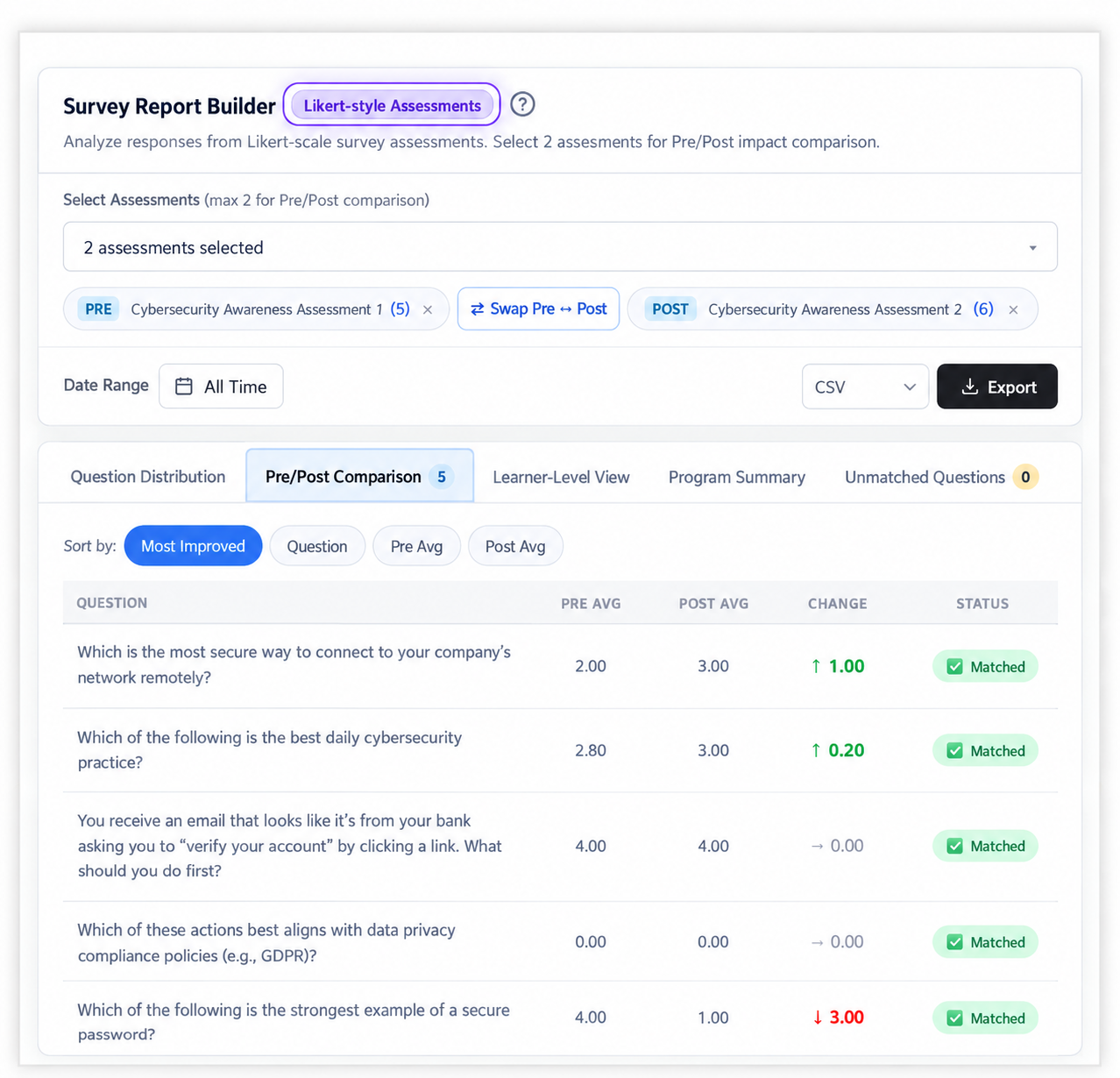
This is the underrated workhorse of any serious assessment platform. You give the same survey or test before and after a course, then compare the results to see what changed.
One distinction is worth making. Likert surveys measure perception: confidence, awareness, and attitude. They don't prove knowledge. To measure knowledge gain, use a scored test before and after. Many programs use both.
In BrainCert, Likert/Survey assessments are unscored. The Pre/Post Comparison report lets you compare up to two of them. It shows how learners responded to each question, which questions are matched across the two assessments, and which questions improved most. A learner-level view shows individual changes, and a swap option reverses the comparison if the assessments were assigned in the wrong order. You can export the report as CSV, Excel, or PDF. Questions are matched by their wording, so keep the question text identical in both assessments.
Forms Inside the Curriculum
Standalone assessments are fine, but platforms that let you embed forms directly in the course turn a one-way lecture into a feedback loop. Think session feedback, onboarding questionnaires, sign-offs, and internal surveys, all collected at the moment they're most useful.
In BrainCert, you can add forms directly inside a course curriculum with the native form builder. It supports Likert-style questions, text fields, dropdowns, a signature field, and more. Submissions can be exported to CSV or Excel, including large datasets.
AI-Assisted Question Creation and Analysis
If your team still handcrafts every question, you're spending time you don't need to. AI can draft question banks and outlines from your existing content. The win isn't that AI writes your test. It's that you start from a decent draft and spend your time on the questions that need a human eye. Always review AI-generated questions before they go live, especially for exams and compliance.
AI can also help after the test. Item analysis flags questions that don't separate stronger performers from weaker ones, which tells you which questions to fix.
In BrainCert, integrated AI tools can generate assessments and courses, and an AI/ML question analysis engine reviews each question and flags those that don't discriminate well between learners.
Automation, Webhooks, and Integrations
A good assessment platform doesn't trap your data. Results should be able to flow to your CRM, HR system, or marketing tools without someone copying them into a spreadsheet.
Webhooks and automation tools make that practical. A learner completes an assessment, an event is sent to your other systems, and a record updates or a manager gets notified.
In BrainCert, webhooks and a developer API let you send events such as enrollments, completions, and assessment results to other tools. Integrations include Zapier, Pabbly, and FlowMattic. Passing scores can also gate certificate issuance, and certificates can carry expiration dates.
Security and Compliance
If assessments involve learner data or high-stakes exams, ask for the vendor's security documentation. BrainCert lists SOC 2 Type II, ISO 27001, GDPR, and HIPAA compliance, with data encrypted in transit and at rest. Always confirm the current scope with the vendor.
How Pricing Really Works
Prices vary widely, and the sticker price rarely tells the full story. Most platforms use one of three models:
- Per learner or per active user. Costs scale with how many people actually use the platform.
- Per assessment, per admin, or per feature. Common in enterprise testing tools, and it can get expensive if you run many programs.
- Flat tiers. Plans with set limits, such as Starter, Growth, and Enterprise. Read what counts as an "active user," a "test," or a "session."
A few traps to check before you sign:
- What happens above your plan limit. Ask about overages and whether access is restricted.
- Add-ons for features you need. Analytics, proctoring, and certificates are sometimes priced separately.
- Setup and onboarding fees, especially on enterprise plans.
- Annual versus monthly pricing. Annual billing is usually discounted. Ask how much.
Example: BrainCert (as listed in October 2026): business plans are priced by active learners per month, defined as people who have logged in and engaged within the last 30 days, with unlimited registered users. Bronze, Silver, and Gold cover 100, 200, and 500 active learners, and are listed at $119, $239, and $511 per month when billed annually (a 20% discount). Monthly billing is $149, $299, and $639. Enterprise plans are custom and start at $10,000 a year. Unlimited assessments are included on all plans, while features such as question analysis and SAML SSO sit in higher tiers. Prices change, so check the pricing page before you plan a budget.
How to Choose: A Practical Framework
Instead of starting with a feature checklist, start with your workflow.
5 Steps to Choose the Right Assessment Platform
Decide what you're measuring
Knowledge checks, skill mastery, compliance sign-off, or confidence shifts? The answer tells you whether you need a test tool, a survey tool, or both.
Decide where results need to go
If they live in the LMS, choose something integrated. If they need to reach your CRM or HR system, integrations and webhooks matter more than interface polish.
Decide who builds and maintains assessments
If subject matter experts will create content, you need an authoring experience that doesn't require a developer. If your L&D team owns everything, you can accept a steeper learning curve for more control.
Run a real pilot
Build one real assessment , run it with a real group, and look at the reports. Differences between platforms show up here, not in a comparison spreadsheet.
Test support during the trial
Send a real question to the vendor's support team. How fast and how well they respond is a good preview of life after you sign.
Common Mistakes to Avoid
Look beyond features and first impressions when evaluating an assessment platform.
Choosing on interface polish
A beautiful dashboard that can't export data or compare pre/post results becomes a liability fast.
Ignoring the learner experience
If tests feel clunky on a phone, completion drops.
Assuming "has analytics" means useful analytics
Sometimes that just means a CSV download. Confirm you can answer the questions leadership will ask.
Locking in too early
Pilot first, then commit.
Frequently Asked Questions
What is the difference between an assessment platform and an LMS? An LMS delivers and tracks learning. An assessment platform focuses on testing and measurement. Many LMS products include assessment tools, so you may not need both.
Can I run proctored exams online? Yes, with a platform that supports it. Options range from lockdown modes to live or automated proctoring with recordings. Match the level of security to the stakes of the exam.
What is a Likert survey? A Likert survey asks people to rate statements on a scale, such as "strongly disagree" to "strongly agree." It's commonly used to measure confidence, attitude, and satisfaction before and after training.
Can AI write my test questions? AI can draft questions quickly from your content, but a person should review them before use, especially for certification or compliance.
How do I know whether my training worked? Compare before and after. Use scored tests to measure knowledge, Likert surveys to measure confidence and perception, and business metrics to see whether behavior changed.

Want to see it in action?
Start a free trial or book a demo to build & run your first assessment
Explore BrainCertThe Bottom Line
The right online assessment platform isn't the one with the most features. It's the one that fits how your team builds content, how learners take it, and where the results need to go.
Focus on the workflow. Insist on real pre/post comparison, real integrations, and real reporting. Run a pilot before you sign anything. The goal isn't to administer more tests. It's to know whether your learning is working.



)