

Engaging learners is one of the biggest challenges that most of the online training institutes face. From running corporate training, certification programs, to online courses, keeping learners actively involved is what determines success.
One of the least utilized yet powerful tools inside an LMS is forms.
You can use forms to onboard, collect feedback, and personalize, turning passive learning into an interactive experience where learners can share what they feel. Let's see how to make use of forms in LMS in a more effective way.
What Are Forms in an LMS?
Forms in a Learning Management System (LMS) are one of those features that seem simple at first, but they do a lot of heavy lifting behind the scenes.
Think of forms as the way your LMS communicates with learners and learns from them at the same time. When a learner signs up for a course, shares feedback, completes a quick survey, or submits an assignment, they’re interacting using a form.
These forms can take many shapes, depending on what you need:
- Registration forms to enroll learners
- Feedback forms to understand their experience
- Surveys and assessments to check knowledge or gather opinions
- Certification and compliance forms to track progress
- Onboarding or lead capture forms to get learners started
But beyond just collecting information, forms help you make sense of what learners are doing and feeling throughout their journey.
Why Forms Are Critical for Learner Engagement
Engagement isn’t just about delivering content; it’s about getting learners involved.
Think about it: when someone is only watching a video or reading text, it’s easy to lose focus. But the moment they’re asked to click, choose, rate, or respond, they naturally become more attentive.
That’s exactly what forms do: they turn learning into a two-way interaction instead of a one-sided experience.
What the Data Tells Us
| Form Experience Type | Engagement Outcome |
|---|---|
| Static content (videos, text) | Low interaction, higher drop-off |
| Basic forms | Moderate engagement |
| Interactive forms (multi-step, dynamic) | High engagement and completion (up to 80%+) |
The more interactive the experience, the more likely learners are to stay, participate, and complete.
Why Forms Make Such a Big Difference
Let’s break it down in a more real-world way. Imagine this inside your LMS:
- A learner finishes a lesson… and moves on
vs - A learner finishes a lesson… and answers a quick 2-question form
That small interaction:
- Reinforces what they just learned
- Keeps their attention from drifting
- Makes them feel involved
Now multiply that across an entire course, and you get consistently higher engagement.
Forms Turn Passive Learning into Active Learning
Instead of this:
“Watch this lesson and continue”
You create moments like:
- “What did you understand from this topic?”
- “Rate the difficulty of this lesson.”
- “Choose the correct answer before moving ahead.”
These micro-interactions break monotony, encourage thinking, and build momentum.
Where Forms Work Best in the Learning Journey
Forms aren’t just one-time tools; they can engage learners at every stage:
- At the start → onboarding forms build intent and curiosity
- During the course → quick forms keep learners involved
- At the end → feedback forms close the loop
Each interaction is a small touchpoint, but together, they create a more engaging and connected learning experience.
They make learners do something, not just consume something.

How to Use Forms in LMS for Better Learner Engagement
Let’s look at some practical ways forms can improve engagement throughout the learning journey.
1. Simplify Learner Onboarding
Forms help you collect key details about learners, such as their goals and skill levels, right at the start. This makes it easier to guide them into the right courses. Since onboarding forms often see high completion rates, keeping them short and relevant can set a strong foundation for engagement.
2. Personalize Learning Paths
Forms allow you to understand learner preferences and experience levels. With this insight, you can recommend relevant courses and create tailored learning paths. When content feels personalized, learners are more likely to stay engaged.
3. Use Forms for Micro-Assessments
Instead of long quizzes, short form-based assessments after each module work better. They help reinforce learning, check understanding, and keep learners actively involved without overwhelming them.
4. Collect Real-Time Feedback
Forms make it easy to gather feedback at different stages of a course. Asking learners what worked and what didn’t, right after a lesson, helps you improve content while making learners feel heard.
5. Increase Engagement with Interactive Forms
Interactive forms feel less like tasks and more like experiences. Using step-by-step flows or conditional questions keeps learners interested and encourages them to complete the process.
6. Reduce Drop-Off with Smart Form Design
Learners often abandon forms that are too long or unclear. Keeping forms simple, mobile-friendly, and broken into smaller steps makes them easier to complete and improves overall engagement.
7. Use Forms for Certification & Compliance
Forms can be used to track course completion, certifications, and compliance requirements. This keeps the process structured while ensuring learners stay involved.
8. Drive Continuous Engagement with Surveys
Surveys aren’t just for feedback; they help maintain interaction. Quick polls or opinion-based questions during courses encourage participation and keep learners engaged.
When used thoughtfully, forms become more than just data collection tools, they turn learning into an interactive, ongoing experience.
How to Make Use of BrainCert’s Forms-in-Curriculum Feature
Modern LMS platforms are evolving, and so are learner expectations. Simply delivering content is no longer enough. Learners expect to interact, respond, and be part of the experience.
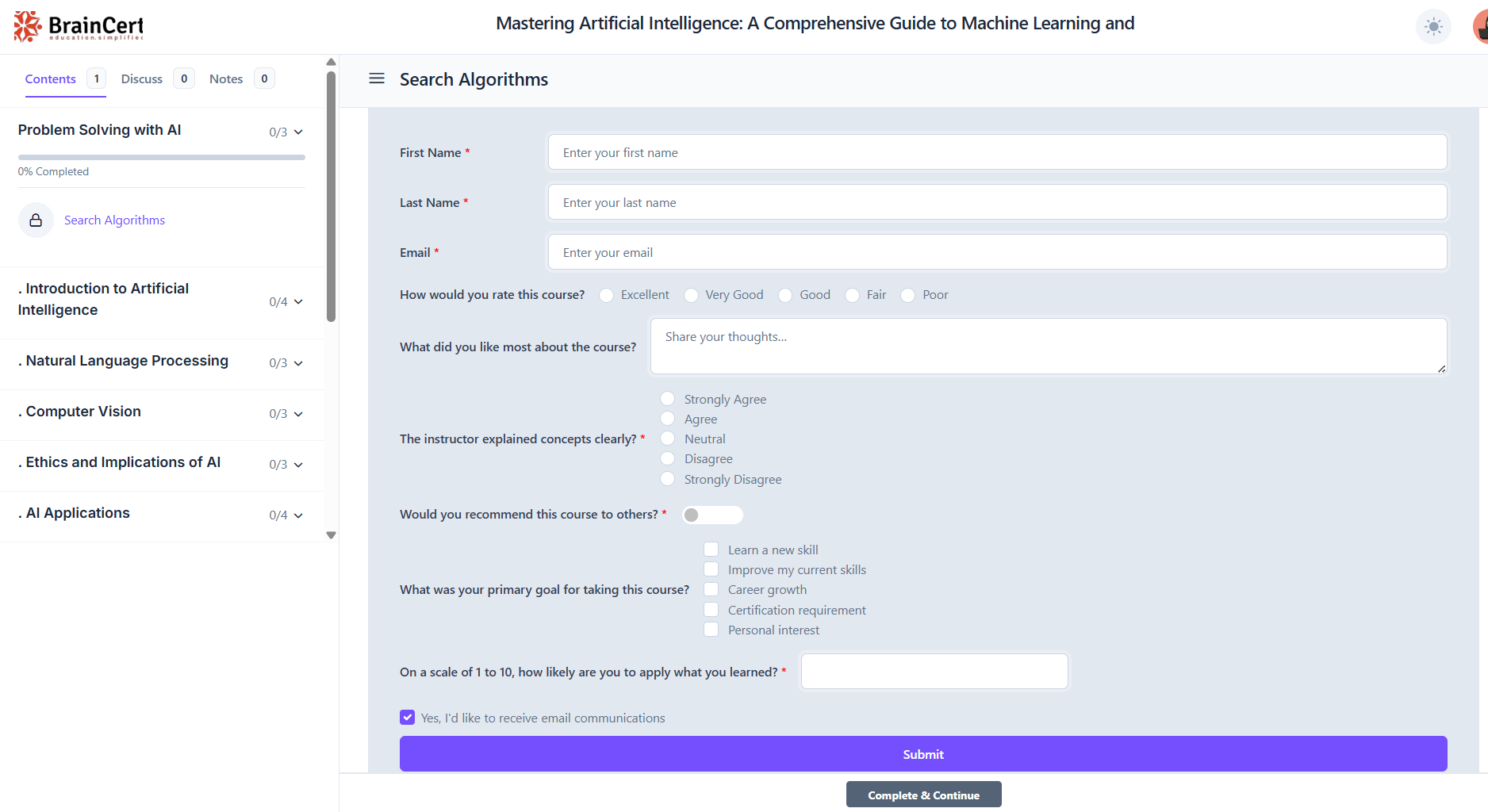
With BrainCert’s latest update, you can now embed forms directly inside your course curriculum, turning what used to be passive lessons into interactive touchpoints.
Forms Inside Course Curriculum
You can now place forms exactly where learning happens, inside modules and lessons, rather than sending learners elsewhere. So, a learner can watch a lesson, answer a few questions, share feedback, or complete an activity without leaving the course.
Flexible Likert-Style Surveys for Deeper Insights
One of the most powerful parts is the ability to create custom Likert-scale surveys, which are widely used in education, psychology, and research to measure opinions, attitudes, and experiences.
A Likert scale is essentially
a structured rating system where learners express how strongly they agree or disagree with a statement.
Instead of asking simple yes/no questions, you give learners a range, such as:
- Strongly Disagree
- Disagree
- Neutral
- Agree
- Strongly Agree
Or in a more LMS-specific context:
- Very Difficult → Very Easy
- Not Useful → Very Useful
- Not Confident → Very Confident
This approach works because it captures intensity. You’re not just asking what learners think, you’re understanding how strongly they feel about it.
Inside BrainCert, you can build these using:
- Radio buttons (single choice) for clear, linear scales like 1–5 ratings
- Checkboxes (multiple choice) when you want learners to select multiple applicable sentiments or dimensions
You can also tailor these questions to match your course goals. For example, after a lesson, you might ask:
- “How confident are you in applying this concept?”
- “How clear was this module?”
- “Would you recommend this lesson to others?”
The real value of Likert-style surveys lies in their ability to turn subjective feedback into measurable data. Over time, you can identify patterns such as which modules are consistently rated as difficult or which topics learners find most valuable.
Multiple Field Types for Maximum Flexibility
Beyond surveys, BrainCert’s form builder gives you the flexibility to design forms for almost any learning scenario. With support for different field types like text inputs, dropdowns, toggles, numeric fields, location selectors, and even signature fields, you’re not limited to just one kind of interaction.
You can go beyond basic feedback and create structured activities within your courses.
For example,
You can design assignment submissions, onboarding questionnaires, detailed feedback forms, or even research-style surveys.
Instead of using multiple tools, everything is centralized, making the experience comfortable for both instructors and learners.
Use Cases: How to Apply This Feature in Your LMS
Here’s how you can use this feature in a practical and meaningful way:
1. In-Lesson Feedback Collection
You can place a short form right after a lesson so learners can share their thoughts while the content is still fresh. This helps you get more honest and accurate feedback, and it also makes learners feel involved in improving the course.
2. Engagement Measurement
Forms can help you understand how learners are really experiencing your course. By using Likert-style questions, you can measure things like how clear the lesson was, how difficult it felt, and how effective the instructor’s explanation was.
3. Assignments and Practice Activities
Instead of using external tools, you can embed forms directly into lessons and use them as assignments. Learners can submit answers, reflect on what they’ve learned, and provide structured responses without leaving the course. This makes the learning process smoother and more interactive.
4. Learner Research and Insights
Forms are also a great way to better understand your learners. You can run short surveys in the course to learn more about participants' preferences, learning behaviors, and skill gaps. These insights help you improve your content and create a more personalized learning experience.
To Conclude
Forms are no longer just for collecting data; they’re now a key part of the learning experience. By embedding them directly into the course and using flexible Likert-style surveys, you can capture real-time insights, personalize learning, and keep learners engaged without disrupting their flow.