Running a Registered Training Organisation is a constant balancing act. You're delivering nationally recognised training, keeping learner records audit-ready, and staying on top of ASQA requirements that never seem to sit still for long.
Add in the day-to-day of actually running a business, enrolments, reporting, client relationships, and it's easy to see why so many RTOs outgrow whatever system they started with.
The uncomfortable truth: most generic LMS platforms weren't built with any of this in mind. They're built for corporate onboarding or university semesters, not competency-based training with audit trails attached.
If you've ever scrambled to pull together evidence for an audit at the last minute, you already know what that gap costs.
At a Glance: What This Guide Covers
| # | Feature | Why It Matters |
|---|---|---|
| 1 | Structured learning paths | Enforces prerequisite order, keeps learners on track |
| 2 | Content dripping | Improves retention, prevents rushed "box-ticking" |
| 3 | Robust assessments | Real evidence of competency, not just pass/fail |
| 4 | Compliance & reporting | Audit-readiness without the scramble |
| 5 | Learner engagement tools | Forms, feedback loops, sign-offs |
| 6 | Automations & webhooks | Cuts manual admin at scale |
| 7 | Branding & customisation | Consistent experience across clients |
| 8 | Scalability & multi-tenancy | Grows with your RTO, not against it |
1. Structured Course Delivery With Learning Paths
Complex curricula overwhelm learners fast, especially with multiple modules, prerequisites, and assessment checkpoints. Without structure, people get lost or skip ahead before they're actually ready. That's exactly the kind of gap an auditor will ask about.
A proper learning path fixes this by defining a clear, sequential route through content. Learners can't jump to Module 4 before completing Module 1; the system enforces the order for you.
What that gets you:
- ✅ Compliance assurance — required units genuinely can't be skipped
- ✅ Better completion rates — learners always know what's next instead of guessing
Platforms like BrainCert build this in natively, bundle courses, set prerequisites, and design a full learning path with completion criteria, no developer required.
2. Content Dripping for Better Knowledge Retention
Anyone who's delivered workplace-based training has seen it: learners rush through a whole unit in one sitting just to tick the box, then retain almost none of it. It happens even more when training competes with shift work.
Drip content fixes this by releasing modules gradually, say, every 48 hours, or once a learner clears a specific assessment.
| Drip Approach | Best For |
|---|---|
| Enrollment-relative (e.g. unlock Module 2, 7 days after signup) | Rolling/self-paced enrolments |
| Fixed calendar dates | Cohort-based programs |
| Per-lesson granularity | Gating individual lessons, not whole modules |
Not every vocational training platform handles this well. BrainCert's drip scheduling is built directly into the course builder, no bolted-on workarounds, with all three approaches above supported natively.
3. Robust Assessment Capabilities
Assessment isn't a formality for an RTO; it's your evidence of competency. That means going well past basic multiple-choice quizzes.
Written and practical assessments: Competency-based training needs question types that reflect real workplace situations: written responses, case studies, scenario-based prompts.
Surveys and feedback tools: Likert-scale surveys are the standard tool for measuring shifts in confidence, attitude, and perceived skill, and they directly support continuous improvement reporting when ASQA comes asking.
Pre/post assessment comparison: Comparing knowledge or confidence before and after training gives you defensible evidence that training worked.
"Did this training actually work?" is the question every L&D leader eventually gets asked, and pre/post comparison reporting is how you answer it with data, not a guess.
Worth looking for specifically:
- Likert/survey-style assessments with matched pre/post comparison reporting
- Question-level insights showing how responses shifted across two assessment points
- Exportable, learner-level and program-level reports for audit and executive use
BrainCert's built-in Likert/Survey assessment mode covers all three: scoring-free survey assessments, automatic pre/post question matching, and comparison reports out of the box.
4. Compliance Training and Reporting
For an RTO, compliance isn't optional; your LMS should make audit-readiness easier, not harder.
| Requirement | What It Looks Like |
|---|---|
| Complete learner records | Every completion, attempt, and result logged and retrievable |
| Certification issuance | Statements of attainment triggered automatically on competency |
| Audit trails | Timestamped logs of what each learner did, and when |
| Expiry tracking | Automated reminders before certifications lapse |
A genuinely useful compliance LMS goes further than record-keeping; it helps you deliver training that's actually engaging, not just a stack of slides learners click through to get it over with.
5. Learner Engagement Features
Compliance-heavy doesn't have to mean boring. Forms, in particular, are underused for more than basic surveys; they can capture context at course start, run feedback loops mid-training, trigger follow-up actions, and support sign-off on workplace-based assessments.
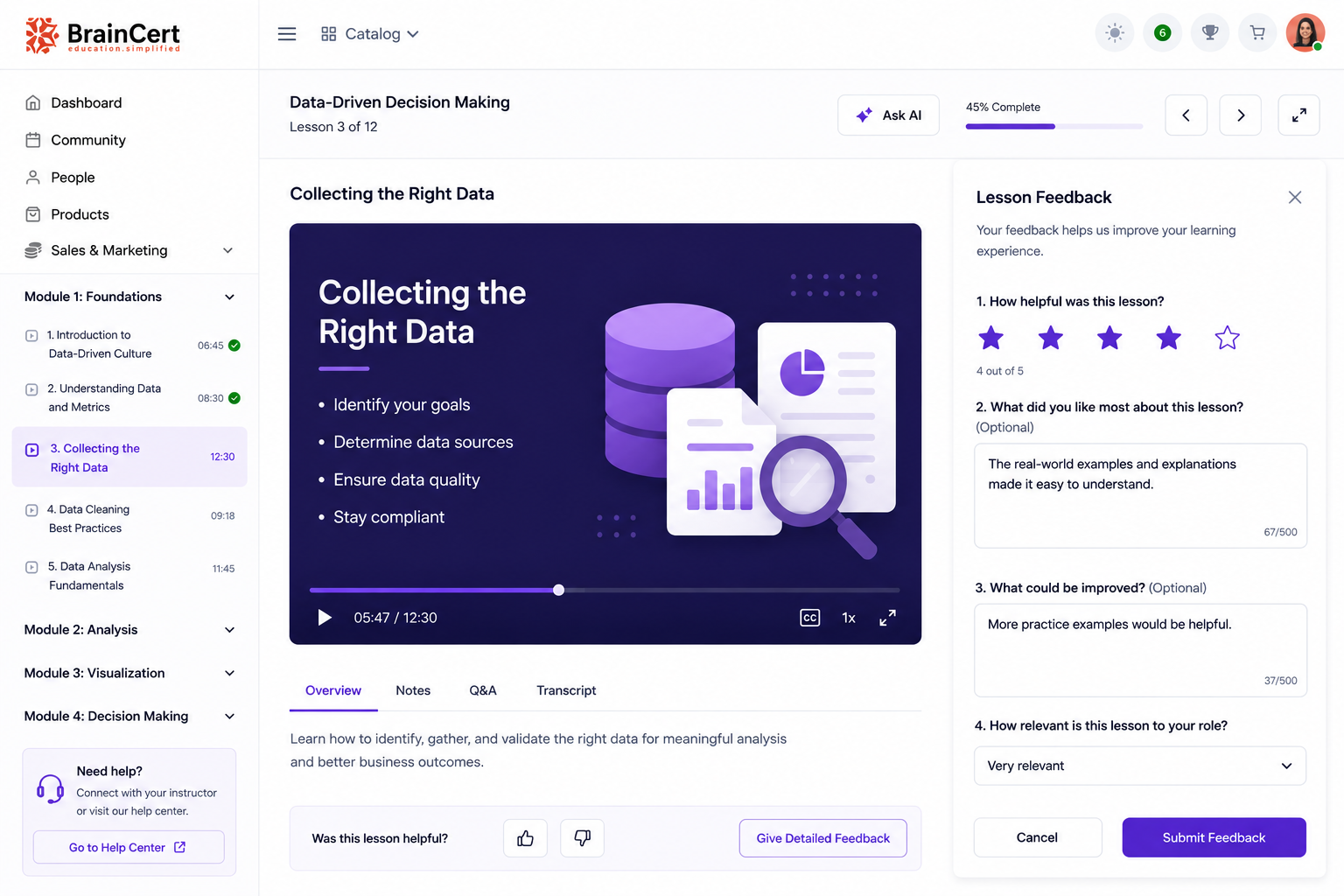
The best platforms let you embed forms directly into your curriculum and connect them to automations, a notification, a tag, and an internal workflow, all triggered by what someone submits. BrainCert's native form builder does this with support for short text, signatures, and fully customisable Likert-style questions, embedded right inside the course.
6. Automations and Webhooks
RTOs operating at scale can't afford to enrol learners, chase reminders, and update records by hand.
Look for:
- 🔁 Enrolment triggers — auto-add learners from forms, external events, or scheduled timelines
- 🔔 Notification sequences — for incomplete modules, upcoming expirations, deadlines
- 🔗 Webhook integrations — connect your LMS to HR systems, CRMs, or reporting tools without manual exports
This matters even more when delivering training for employer clients who expect real-time visibility into their people's progress. Webhooks fire on events like enrolment, completion, and assessment results, so a finished compliance module can notify a manager or update a CRM automatically, no spreadsheet required.
7. Branding and Customisation
Your LMS is part of the learner experience, whether you think about it that way or not. A platform that looks generic or worse, like a competitor's, does nothing for your brand.
Worth having:
- Custom branding across learner portals and dashboards
- White-label options for partnership or group delivery
- Configurable colours, logos, and domain settings
If you work with multiple client organisations, spinning up a properly branded portal quickly, without a dev project attached, is a real advantage, not a nice-to-have.
8. Scalability and Multi-Tenancy
As your RTO adds courses, partnerships, or interstate delivery, your system needs to grow with you, not become the bottleneck.
Ask before you commit:
- Can it support multiple trainers or departments with genuinely separate environments?
- Is there a hard ceiling on learner numbers or enrolments?
- Does pricing scale in a way you can actually predict?
Multi-tenancy, managing several RTOs or client accounts from one admin login, with full data separation, matters more than most providers realise until they're already stuck without it.

Choosing the Right LMS for Your RTO
There's no single perfect system that checks every box for every RTO. But the capabilities below cover what serves most providers well:
| ✅ Checklist | Have It? |
|---|---|
| Structured learning paths for guided delivery | ☐ |
| Content dripping for engagement and retention | ☐ |
| Assessment tools incl. surveys + pre/post comparison | ☐ |
| Compliance-ready reporting and record-keeping | ☐ |
| Learner engagement and automation features | ☐ |
| Branding flexibility | ☐ |
| Scalability and multi-tenancy | ☐ |
To Conclude
Before committing, map your current and future requirements against what's actually on offer. Run a trial with a small cohort of learners. Ask directly about data ownership and export rights. And make sure whatever you choose has a real track record with RTOs. Compliance and vocational training have specific demands that generic eLearning platforms often overlook until it's too late.
The right system doesn't just deliver courses. It makes audit season less painful, gives learners a clearer path to competency, and frees your team up to actually focus on training, not chasing paperwork.