
Most LMS comparison guides read like feature soup. Vendor A has gamification. Vendor B has SCORM. Vendor C has AI. But for enterprise buyers- the people writing the actual purchase orders- the conversation needs to be sharper. You don't need a marketing brochure. You need a technical checklist that pressure-tests what a vendor claims against what their platform actually does.
After reviewing platforms that scale from 50-seat pilots to 50,000-learner rollouts, this is the practical checklist we wish more procurement teams walked into vendor calls with. Print it, share it with your IT counterpart, and use it to cut through demo theater.
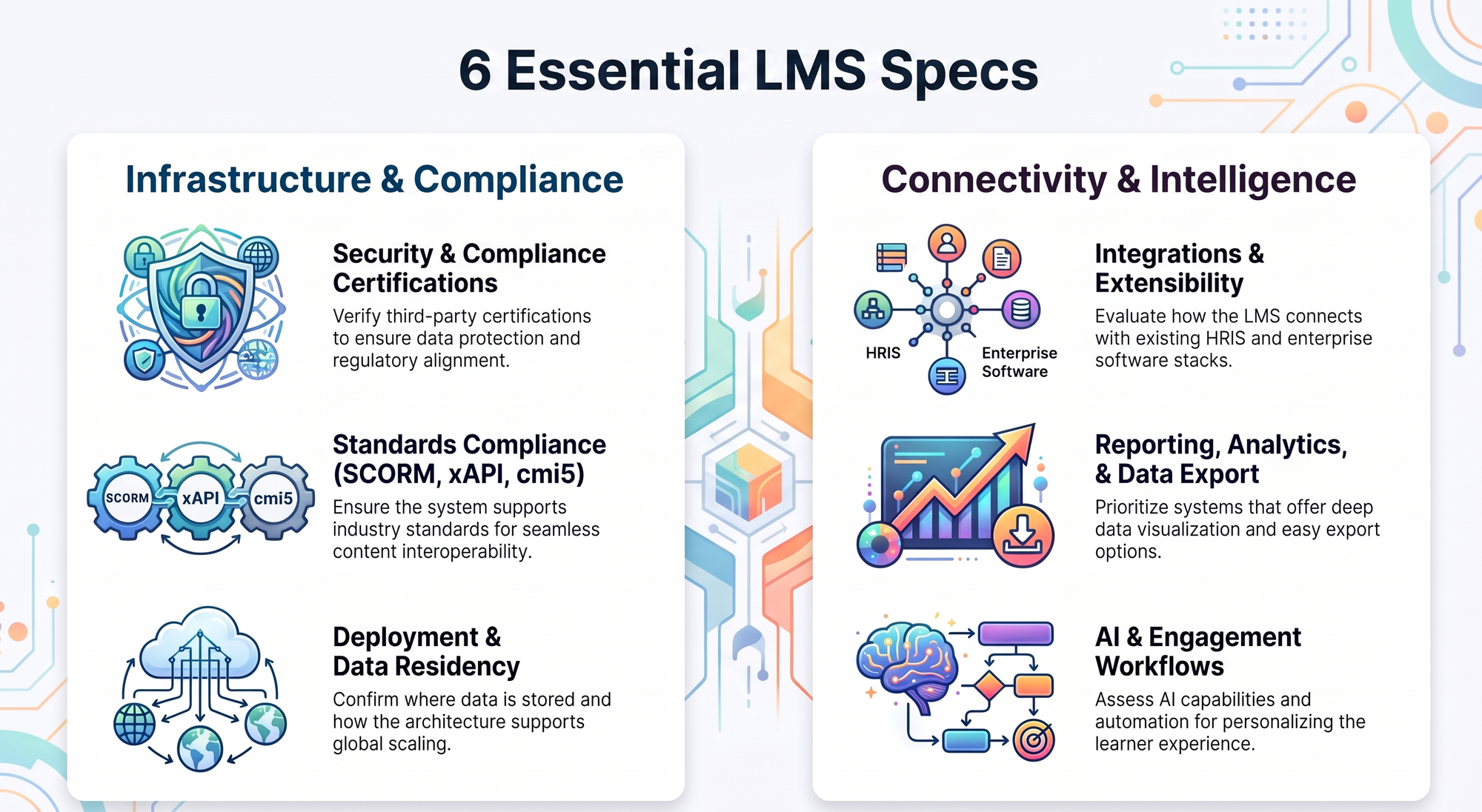
1. Deployment Architecture and Data Residency
Enterprise buyers shouldn't accept "we're in the cloud" as an answer. Dig into specifics:
- Single-tenant or multi-tenant architecture?
- Which regions host the data centers, and can you pin storage to a specific geography for data residency?
- Failover architecture: active-passive or active-active?
- Containerization (Kubernetes, Docker) for predictable scaling?
- Backup cadence and recovery time objectives (RTO) documented?
A vendor that can't answer these cleanly is signaling you don't have a real enterprise tier; you have a multi-tenant SaaS stretched to fit your use case.
2. Authentication and Single Sign-On
This isn't optional. Enterprise IT will block your purchase if SSO isn't there from day one.
- SAML 2.0 and OpenID Connect support?
- Native connectors for Okta, Microsoft Entra, Google Workspace, Ping?
- Role mapping from IdP groups into LMS roles automatically?
Also confirm whether MFA is enforced at the org level rather than per user. Platforms that only offer per-user toggles create security blind spots your CISO will flag.
3. Security and Compliance Certifications
A real enterprise LMS should hand you a current compliance dossier on request:
- SOC 2 Type II report (not just Type I; Type II covers actual operating periods)
- ISO 27001 certification
- GDPR and HIPAA posture documentation
- Encryption at rest using AES-256 and TLS 1.2+ in transit
- Penetration test summaries from the last 12 months
This is one of the easiest filters. If a vendor hesitates or says "we're working on it," you've already learned something important about how they treat enterprise compliance. It's also worth noting how few platforms clear this bar cleanly; BrainCert, for example, holds both SOC 2 Type II (recertified annually) and ISO/IEC 27001:2022, alongside GDPR and HIPAA compliance documentation available on request. Ask every finalist for the equivalent before you shortlist them.
4. Standards Compliance: SCORM, xAPI, cmi5
Your legacy training content isn't going anywhere. Confirm the LMS speaks every relevant standard:
- SCORM 1.2 and 2004 ingestion and runtime
- xAPI (Tin Can) statement capture and routing
- cmi5 for formally tracked learning experiences
- LRS compatibility for xAPI data portability
A platform that doesn't speak these standards will force a costly content migration the moment you outgrow its native formats.
5. Assessment Engine Depth
Quizzes are table stakes. Enterprise buyers should look for serious assessment depth:
- Question banking with randomization and item difficulty tagging
- Pre/post comparison analysis to measure how learner perceptions actually shift
- Likert-scale and survey assessment types for soft-skill and culture training
- Multiple proctoring options: live, recorded, AI-assisted
- Accessibility accommodations: extended time, alternative formats, screen reader support
Platforms that include Likert and survey assessments with built-in pre/post comparison reporting, a capability you'll find in platforms like BrainCert, are particularly useful for measuring real attitude or behavior shifts rather than just pass/fail outcomes. Soft-skill, onboarding, and culture programs need that depth to show ROI.
6. Content Delivery Models
How content is released matters as much as how it's built. You want flexibility across:
- Drip content — scheduled release over time
- Open access — everything unlocked from day one
- Learning paths — sequenced milestones with prerequisites
- Learning journeys — adaptive, branched experiences that respond to learner behavior
Drip vs. open access is rarely an either/or decision. Many enterprises want drip for compliance and onboarding, open access for elective upskilling, and learning paths for certifications. Make sure the LMS supports all three without forcing a custom build every time.
7. AI Capabilities
Every vendor claims "AI-powered" right now. Enterprise buyers should pin down what that actually means before signing:
- Where does the AI run: inside your tenant or shared infrastructure?
- Is your content isolated from model training?
- Can the AI generate courses, quizzes, summaries, translations?
- Is there a human review layer before any AI-generated content goes live?
- Are there audit logs of every AI action for governance?
As AI-driven course creation accelerates through 2026, governance around these tools is becoming a board-level concern, not just an L&D one. Vendors who can show you their AI architecture are signaling seriousness.
8. Integrations and Extensibility
Your LMS doesn't live in a vacuum. Confirm:
- Native integrations for HRIS (Workday, BambooHR, SAP SuccessFactors), CRM, calendar, and video conferencing
- Public REST API with documented rate limits
- Webhooks for event-driven automation rather than polling
- Low-code connectors through Zapier, Make, or n8n
- A sandbox environment where integration testing doesn't touch production data
Webhooks in particular are non-negotiable in modern learning systems. They should push events enrollment, completion, certificate issued- straight into your HRIS, data warehouse, or messaging stack. If the LMS only offers nightly batch sync, your training data will always be a day behind reality.
9. Reporting, Analytics, and Data Export
Enterprise reporting is where a lot of LMS projects quietly fail. Ask hard questions:
- Pre-built dashboards for completion, compliance, engagement, and skill gaps
- Custom report builder with filterable, exportable fields
- Scheduled report delivery to stakeholders
- Full data export in CSV, JSON, or Parquet
- BI tool connectors for Power BI, Tableau, Looker, or Snowflake
Compliance training especially demands reliable reporting: completion certificates, audit trails, and exception reports per learner. If generating those requires a paid professional services engagement each cycle, budget for it now.
10. Form Builder and Engagement Workflows
Forms drive more enterprise training workflows than most buyers realize. Verify:
- Drag-and-drop form builder with conditional logic and branching
- Embedded forms inside course curriculum, not just external pages
- Triggers that fire emails, tag users, send notifications, or kick off downstream automations
- HIPAA/GDPR-compliant data handling for sensitive responses
- Follow-up actions for sales, marketing, HR, and event teams alike
Embedding forms directly inside courses, collecting feedback mid-module, gating progression on a check-in, or capturing compliance acknowledgments is what turns an LMS into an actual workflow engine rather than just a content library.
11. Accessibility and Localization
If your workforce spans regions or abilities, this isn't a nice-to-have. It's a hard requirement:
- WCAG 2.1 AA conformance (ideally AAA)
- Screen reader compatibility tested against JAWS, NVDA, and VoiceOver
- Full keyboard navigation
- Multi-language UI, not just content translation
- RTL language support for Arabic, Hebrew, and Urdu
- Caption and transcript support for all video content
Vendors often bury accessibility docs. Ask for their VPAT or ACR and read it yourself before signing.
12. Support, SLAs, and Vendor Viability
The most overlooked section of any checklist, and the one that bites hardest in year two:
- Live support hours matching your operational time zones
- Documented uptime SLA; 99.9% is typical, 99.95% is enterprise-grade
- Named customer success manager and implementation lead
- Escalation paths with guaranteed response times for P1 incidents
- Vendor financial health, funding stage, and customer base size
A flashy demo can hide a five-person support team. Ask to speak with two existing enterprise customers of similar size, and ask them about incidents, not just renewals.

Quick-Fire Checklist Before the Demo
Want a single page to walk into vendor calls with? Use this consolidated checklist to make sure you cover the key technical, security, integration, and accessibility requirements.
Tip: Bring this checklist to every vendor demo and mark each requirement as confirmed, needs verification, or unavailable.
Wrapping Up
Enterprise LMS buying is a technical exercise dressed up as a vendor relationship. The vendors who respect that, answering architecture questions openly, sharing compliance reports without hesitation, and walking you through webhook payloads in real time, are usually the ones still standing when you renew.